French standard NF Z71-300

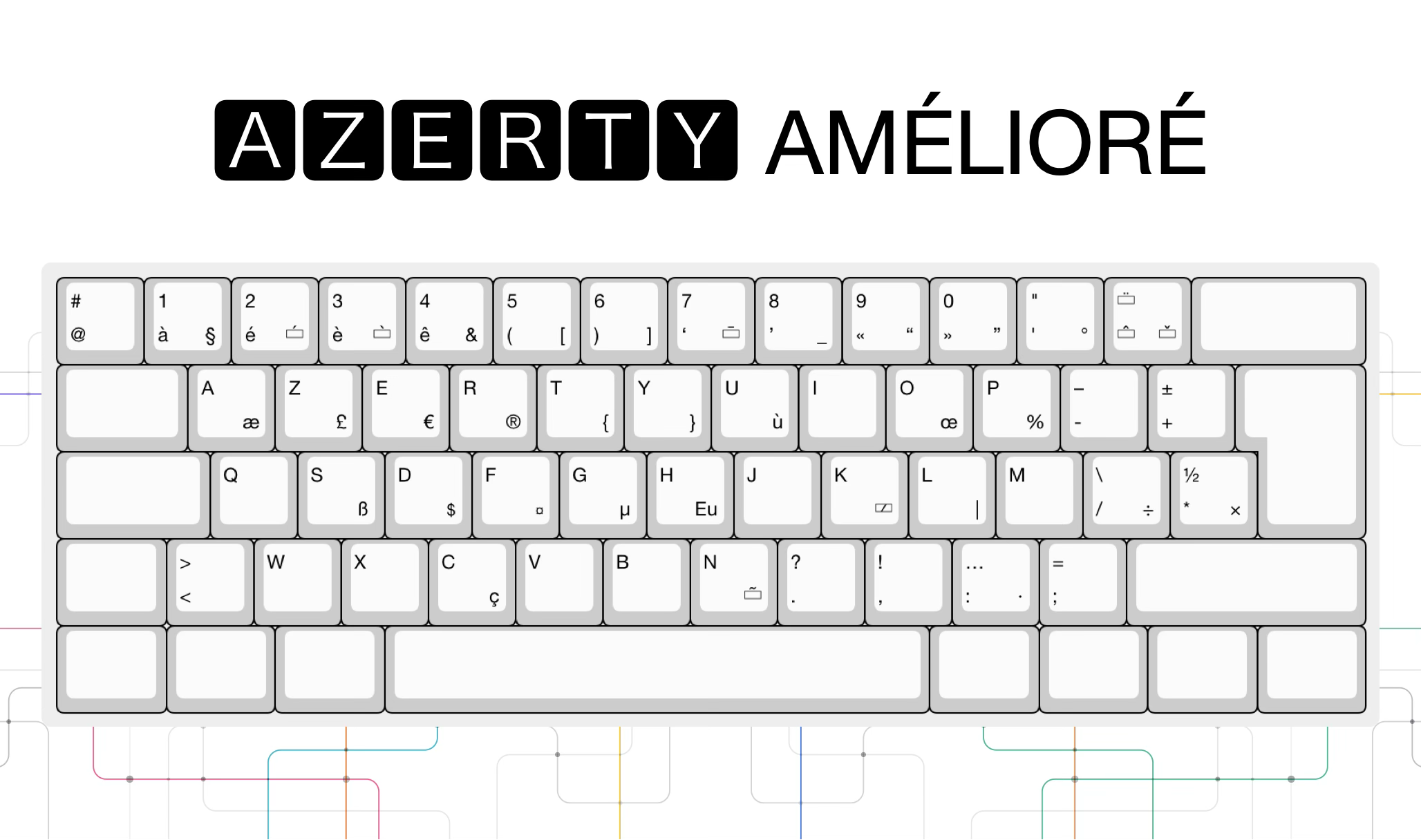
⌨️ AZERTY Improved Keyboard A project launched by the French Ministry of Culture to make it easier to write πŸ‡«πŸ‡· French, regional languages and European languages πŸ‡ͺπŸ‡Ί using the Latin alphabet, with the same layout on πŸͺŸ Windows, 🍎 macOS and 🐧 Linux/Unix.

An evolution of the AZERTY keyboard that preserves existing habits while making French characters and accented letters used by Latin-alphabet languages accessible. The project was launched by the Ministry of Culture, standardized by AFNOR (NF Z71-300), then integrated natively into Windows 11 version 24H2.

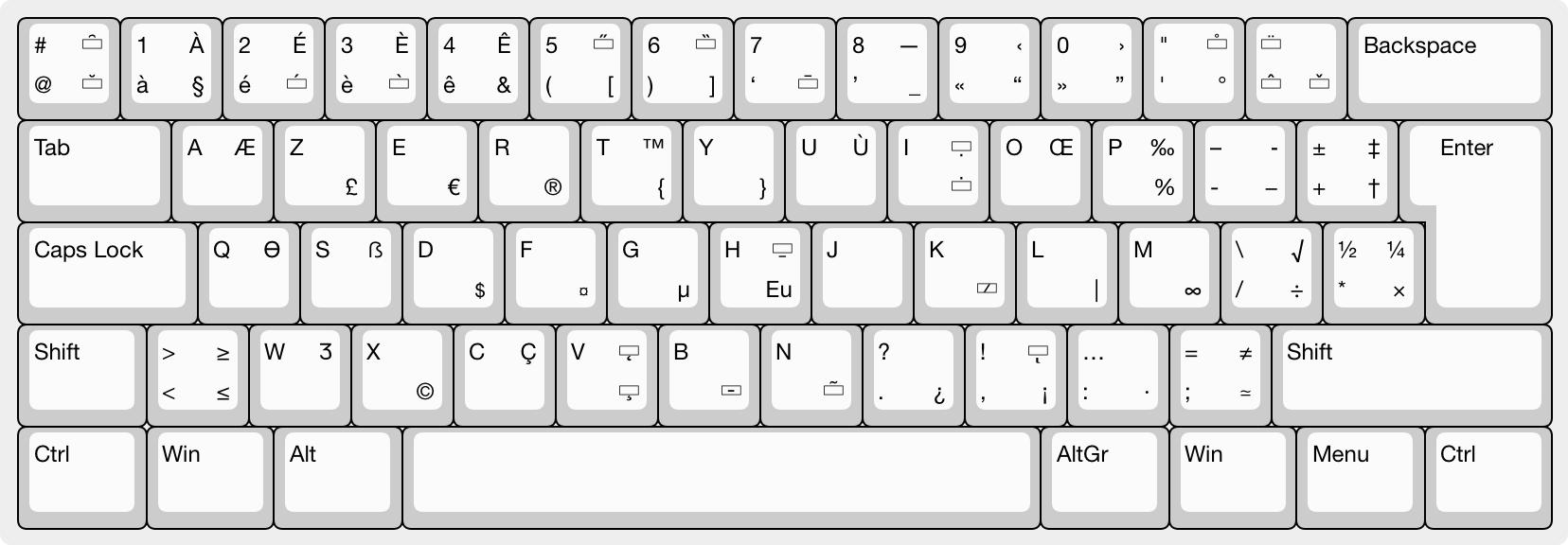
AZERTY Improved layout

Problem

What classic AZERTY makes difficult

  1. Historically, there has been no single standard truly applied everywhere, creating layout differences between manufacturers and operating systems.
  2. Several useful French characters are difficult to type on classic AZERTY, especially accented uppercase letters, ligatures (Ε“, Γ¦ and their uppercase forms), and some typographic signs.
  3. Typing French regional languages and many European Latin-alphabet languages is incomplete or not ergonomic on the most common layouts.
  4. Specialized characters useful in technical documents (for example scientific and mathematical symbols) are often hard to access.

History & Standardization

From public initiative to Windows support

  1. 2015

    Project launch

    The Ministry of Culture asks AFNOR to work on a keyboard layout better suited to modern French.

  2. 2017

    Broad consultation

    Manufacturers, associations, language experts and ergonomists contribute to defining the future standard.

  3. April 2, 2019

    Official presentation

    The standard is presented at the Ministry of Culture before practical rollout.

  4. April 2019

    NF Z71-300 publication

    AFNOR publishes the voluntary standard formalizing AZERTY Improved. The community then develops pilot layouts for Windows, macOS and Linux/Unix, while Cherry GmbH offers a first compatible keyboard.

  5. October 1, 2024

    Native Microsoft support

    The standardized French layout is officially integrated into Windows 11 version 24H2 from October 1, 2024.

Goals

What AZERTY Improved brings

  1. Harmonize computer keyboards in France and reduce character-layout differences between manufacturers and operating systems.
  2. Improve ergonomics for typing French while staying close to existing AZERTY keyboards, making the evolution easy to adopt.
  3. Allow typing all characters used by French regional languages, including Breton, Basque, Occitan, Catalan, Corsican, Alsatian and Franco-ProvenΓ§al.
  4. Allow typing characters used by Latin-alphabet languages in Europe, prioritizing common uses (Polish, German, Spanish, Portuguese, Italian, Scandinavian languages, Czech, Slovak, etc.).
  5. Make new character sets more accessible for technical or specialized documents (Greek alphabet, mathematical symbols, etc.).

Installation

Install and test

Start by enabling the layout in your system. Key maps, external keyboards and stickers then make the transition easier.

Windows Included

Required steps

  1. Since Windows 11 version 24H2, AZERTY Improved is included under the name AZERTY Standard (legacy: Traditional). Select AZERTY Standard in keyboard settings. For previous Windows versions, install an AZERTY Improved layout provided by the community.

macOS Manual installation

Required steps

  1. Download, install and select the AZERTY Improved layout in keyboard settings. More system installation details are available in the azerty_macos.

Linux Ubuntu Manual installation

Required steps

  1. Install an AZERTY Improved layout provided by the community, then select it in Ubuntu keyboard settings.

Visual reference

Key map

For a first hands-on experience, it is useful to print a keyboard map.

However, it is important to understand that:

  • the A-Z letters do not move,
  • the transition is therefore very quick for regular typing,
  • the main changes concern symbols and special characters:
    • dead keys for the regional languages of France,
    • dead keys for Latin-alphabet languages, such as European Union languages and Turkish,
    • typographic symbols, such as quotation marks, chevrons and ligatures.
Full AZERTY Improved key map

Hardware

Keyboard with AZERTY Improved printed on the keys

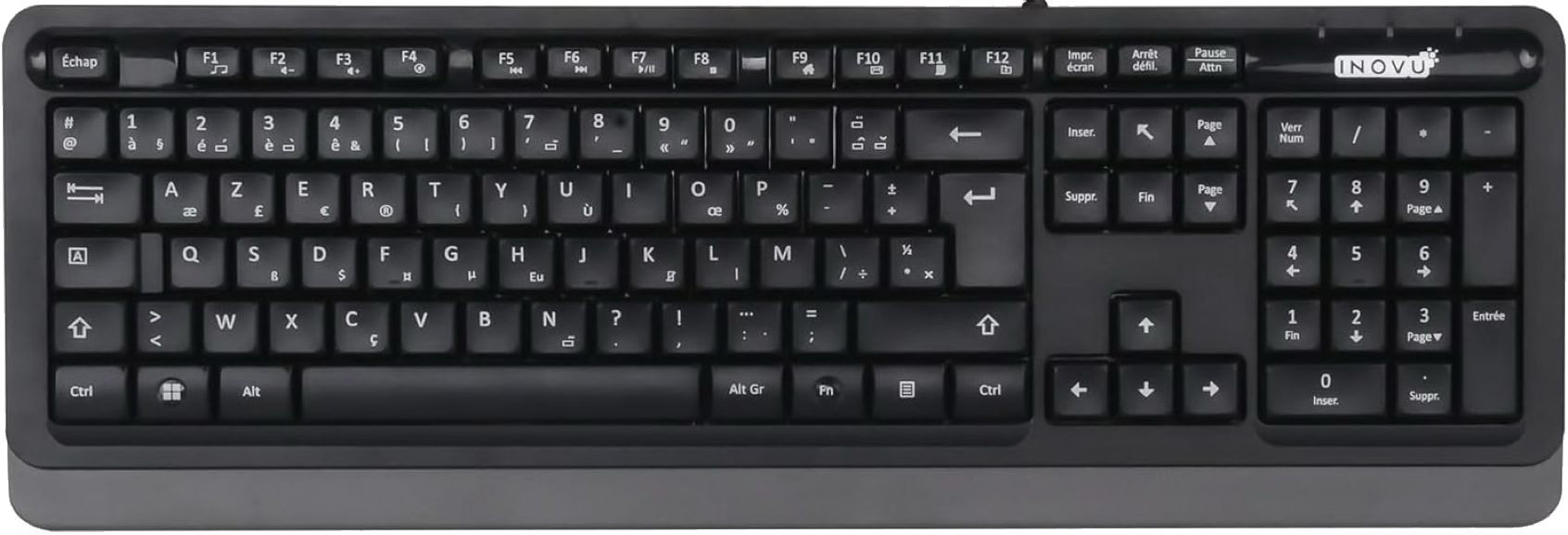
The best way to use AZERTY Improved is to have a keyboard with printed markings that match the layout. After selecting AZERTY Improved in system settings, some keys will no longer produce what is printed on the keys of your current keyboard. Today, the keyboard available on the market, and probably the only one available in 2026, is INOVU BW10β„’, which makes working with this layout easier.

INOVU BW10 keyboard with AZERTY Improved key markings.

Practical transition

Stickers

Keyboards with AZERTY Improved markings are still rare. Once you test this new layout, the key map helps a lot, but mistakes still happen, especially on keys where you look for a symbol visually.

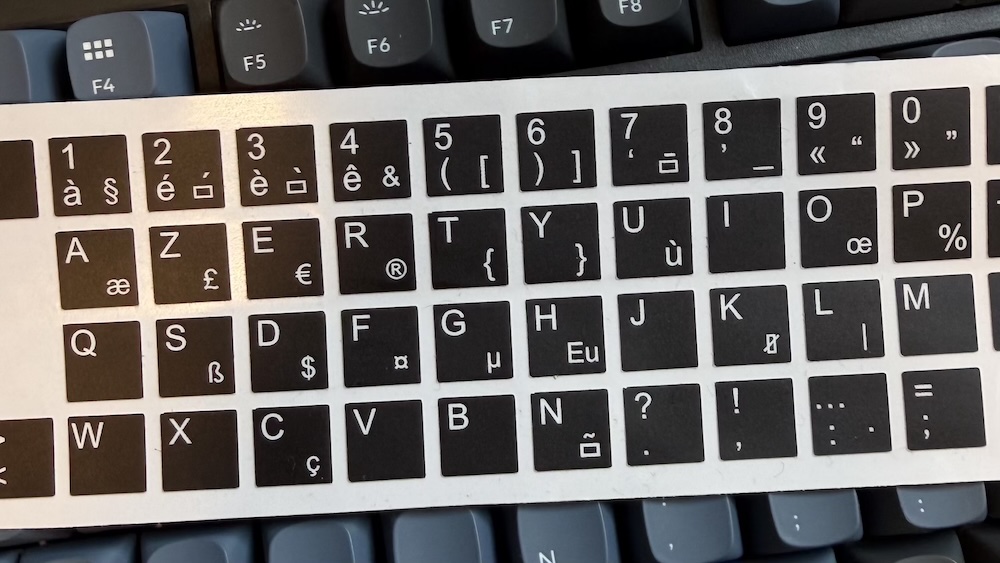
To avoid this, there is a simple solution: stickers. Apply only the labels you need, then add more stickers later as needed. The set contains all letters and symbols needed to adapt a keyboard that does not yet match the new AZERTY layout, including a keyboard printed for a non-Latin-script language, such as Russian.

AZERTY Improved stickers, also searched as AZERTY+, AZERTY Plus or New AZERTY

To find them online, also search for the names used by sellers: AZERTY Improved stickers, AZERTY+, AZERTY Plus or New AZERTY.

Author & Contact

Author & Contact

I use macOS, Windows and Linux (Ubuntu), with multilingual needs (French, English, Polish).

Moving from one system to another remains painful: symbols move between macOS, Windows and Linux, and accented-character input varies by system, especially on Windows. Tools exist (such as Microsoft PowerToys), but they do not cover every case.

I discovered the AZERTY Improved project through norme-azerty.fr, which has promoted it from the beginning. The project was launched by the French Ministry of Culture πŸ‡«πŸ‡· and standardized by AFNOR. It enables coherent and complete typing for several European πŸ‡ͺπŸ‡Ί languages.

Adoption has already started: Microsoft integrated the standard and the first keyboards are appearing on the market. The main challenge now concerns built-in laptop keyboards, especially those offered by Apple, Microsoft and major brands.

I created this page to help popularize this standard in my own way and in connection with my own needs.

➑️ Try it, talk about it, and ask manufacturers for AZERTY Improved keyboards. πŸ‘‹